I'm working on learning more about Microsoft's Sysinternals. There are a lot of really handy sounding utilities, and too many for me to keep track of. I was looking through the disk utils, and I found LDMDump. It's a utility that prints out information on the logical disk scheme. Here's a quote from the utility's page:
"There are no published APIs available for obtiaining detailed information about a disk's LDM partitioning, and the LDM database format is completely undocumented. LDMDump was developed based on study of LDM database contents on a variety of different systems and under changing conditions."
Now, I ask you...how ridiculous is it that a Microsoft-paid developer has to resort to essentially reverse engineering a partitioning scheme to figure out how it works? "The LDM database format is completely undocumented". Unreal.
Tuesday, January 6, 2009
Monday, January 5, 2009
Debugging traffic flow in netscreens
I use Juniper Netscreen (5GT and SSG5) to maintain the intersite VPNs in my company, and to function as firewalls. I was having an FTP issue today, which I suspect is caused by the firewall, so I wanted to see what was going on.
If you work on several pieces of equipment that are similar in function and interface, you might get confused, or your brain takes a shortcut, and you end up doing something silly, like typing "ls" at a Windows command line. Same thing with me and routers sometimes, so I logged into my netscreen and typed "debug" and hit question mark, because I wasn't sure of the argument list. The list of arguments came up, and I started scrolling through , looking for likely candidates. Around this time, it hit me, "There is no debug statement in ScreenOS". I quit out, and just hit "?", which should give me a list of all available commands. Sure enough, it wasn't listed there:
alpha:ns1(M)-> ?
clear clear dynamic system info
delete delete persistent info in flash
exec exec system commands
exit exit command console
get get system information
ping ping other host
reset reset system
save save command
set configure system parameters
trace-route trace route
unset unconfigure system parameters
alpha:ns1(M)->
Well...huh. So I googled it. It turns out that there is a debug command, just not generally documented, and it can do what I'm looking for. I found a blog entry on Geek2Live that seemed to hold the general ideas of what I wanted, and it even included a nifty mindmap to explain it.
If you're interested in this sort of thing, you might enjoy this list of hidden ScreenOS commands and the Juniper knowledge base article on capturing debug flow information.
If you work on several pieces of equipment that are similar in function and interface, you might get confused, or your brain takes a shortcut, and you end up doing something silly, like typing "ls" at a Windows command line. Same thing with me and routers sometimes, so I logged into my netscreen and typed "debug" and hit question mark, because I wasn't sure of the argument list. The list of arguments came up, and I started scrolling through , looking for likely candidates. Around this time, it hit me, "There is no debug statement in ScreenOS". I quit out, and just hit "?", which should give me a list of all available commands. Sure enough, it wasn't listed there:
alpha:ns1(M)-> ?
clear clear dynamic system info
delete delete persistent info in flash
exec exec system commands
exit exit command console
get get system information
ping ping other host
reset reset system
save save command
set configure system parameters
trace-route trace route
unset unconfigure system parameters
alpha:ns1(M)->
Well...huh. So I googled it. It turns out that there is a debug command, just not generally documented, and it can do what I'm looking for. I found a blog entry on Geek2Live that seemed to hold the general ideas of what I wanted, and it even included a nifty mindmap to explain it.
If you're interested in this sort of thing, you might enjoy this list of hidden ScreenOS commands and the Juniper knowledge base article on capturing debug flow information.


Sunday, January 4, 2009
Catagorized screw heads
Most people have to deal with two types of screws: flat heads and cross-heads. Sysadmins are not most people.
I've dealt with hex heads, security bits, weird triangle things, and stuff I could hardly describe. Someone, however, has gone to the effort to categorize different screw heads. Here's the writeup on instructables.
Anyone want to start bragging about how big their security bit set is? ;-)
I've dealt with hex heads, security bits, weird triangle things, and stuff I could hardly describe. Someone, however, has gone to the effort to categorize different screw heads. Here's the writeup on instructables.
Anyone want to start bragging about how big their security bit set is? ;-)
Thursday, January 1, 2009
Cisco Feature Navigator for IOS images
Ever look at the filename of the Cisco IOS image on a router and wonder what all the letters mean and what capabilities are included in your OS?
To find out, you can go through a few dozen pages in the IOS Reference Guide, or the much longer Cisco IOS Packaging (Product Bulletin No. 2160).
If you want a quicker way to find out what's in your image, you can use the Cisco Feature Navigator. It's really simple. You put in the image name that your device boots from and it gives you a list of what features you've got. Figuring out those individual features is left as an exercise for the reader ;-)
To find out, you can go through a few dozen pages in the IOS Reference Guide, or the much longer Cisco IOS Packaging (Product Bulletin No. 2160).
If you want a quicker way to find out what's in your image, you can use the Cisco Feature Navigator. It's really simple. You put in the image name that your device boots from and it gives you a list of what features you've got. Figuring out those individual features is left as an exercise for the reader ;-)
Wednesday, December 31, 2008
Update on the Zune issue
Who called it? Who da man?.
Zune freeze issue is a result of the Leap Year.
OK, enough gloating. Hopefully they'll fix the firmware before 2012 ;-)
Zune freeze issue is a result of the Leap Year.
OK, enough gloating. Hopefully they'll fix the firmware before 2012 ;-)
Note to anyone selling equipment
ALWAYS wipe your equipment before you sell it to anyone.
This includes things like hard drives and network devices.
I can't mention any names at all, or specifics, but I ordered a couple of refurb routers a few days ago, and I was very surprised today when I saw full router configs in place, complete with IPSec settings, ACLs, and plaintext read/write SNMP strings.
Always wipe your configs before you sell the devices. Always.
This includes things like hard drives and network devices.
I can't mention any names at all, or specifics, but I ordered a couple of refurb routers a few days ago, and I was very surprised today when I saw full router configs in place, complete with IPSec settings, ACLs, and plaintext read/write SNMP strings.
Always wipe your configs before you sell the devices. Always.
Zune: Y2K + 8 11.9/12
If your Zune doesn't work this morning, it's not just you.
Apparently, Zunes all over the world froze at or near midnight(local time) last night.
The fact that this follows an iPhone post isn't me gloating, that's just a coincidence. Promise. ;-)
[Edit] It just occurred to me that since this is a leap year, today is day 366. It would be hilarious if they screwed that up.
Apparently, Zunes all over the world froze at or near midnight(local time) last night.
The fact that this follows an iPhone post isn't me gloating, that's just a coincidence. Promise. ;-)
[Edit] It just occurred to me that since this is a leap year, today is day 366. It would be hilarious if they screwed that up.
The mobile device is dead! Long live the mobile device!
My blackberry died at a particularly inopportune moment over the holiday weekend. Specifically sometime between when I went to bed on the 25th and when the firewall cluster members decided to kill each other on the 26th. In any event, I didn't find out about it until nearly noon, which is Not Good(tm).
To rectify the situation, I got permission to go buy another phone, and I cleared it with the president to pick up an iPhone, since there were a lot of positive responses when I asked, way back in November. Matt's response in particular swayed my opinion.
In the intervening week, I have to say that I've become pretty attached to the thing. With some additional apps from the AppStore (if you're considering getting an iphone, prepare to hear that phrase a lot), it becomes much easier to type mail (get Firemail for landscape typing), there are free RDP, VNC, ssh (touchterm), and other apps as necessary, and best of all, there are built-in settings for VPN (IPSec, PPTP, and L2TP). Browsing the web using Safari in landscape mode makes even Opera mini on the Blackberry look like masochism.
In fact, the only complaint that I have is that the notification options suck. Apple really, really dropped the ball with the configuration options for notifications. You can change ringtones for phone calls and text messages, but you cannot change ringtones or adjust volume for incoming email. At all. And the default notification is a quiet, polite "blip", which doesn't wake me up at 3am. And that's a deal breaker.
Before I took my iPhone back, I wanted to try everything, so I decided to jailbreak (I used quickpwn for Windows) it and see what I could change. The process went very, very smoothly (as soon as I realized the the "power" button is the one on the top right that you click to lock the phone).
I used Cydia (the jailbreak equivalent of the App Store) to install OpenSSH on the phone:
Matt-Simmons:/usr root# uname -a
Darwin Matt-Simmons 9.4.1 Darwin Kernel Version 9.4.1: Sat Nov 1 19:09:48 PDT 2008; root:xnu-1228.7.36~2/RELEASE_ARM_S5L8900X iPhone1,2 arm N82AP Darwin
and used that to sftp in and copy the ringtone to my desktop, which I then modified using Audacity to increase the volume and added a double beat to the beginning, so that it now goes "chi-ching!". Saved that, exported it as an AIFF file, renamed it to the original new-mail.caf and then dragged it back across the sftp pipe to the phone. Sent an email to myself, and I'm now guaranteed to be woken up if I get mail at night.
I should really look into getting a dev kit for the phone. It would be really handy to support actual profiles and to use the GUI to set things like this up. There is a local terminal app available, but it doesn't appear to be supported on my firmware. I'm sure it'll be updated shortly.
Anyone else have any neat tricks for a jailbroken iPhone?
To rectify the situation, I got permission to go buy another phone, and I cleared it with the president to pick up an iPhone, since there were a lot of positive responses when I asked, way back in November. Matt's response in particular swayed my opinion.
In the intervening week, I have to say that I've become pretty attached to the thing. With some additional apps from the AppStore (if you're considering getting an iphone, prepare to hear that phrase a lot), it becomes much easier to type mail (get Firemail for landscape typing), there are free RDP, VNC, ssh (touchterm), and other apps as necessary, and best of all, there are built-in settings for VPN (IPSec, PPTP, and L2TP). Browsing the web using Safari in landscape mode makes even Opera mini on the Blackberry look like masochism.
In fact, the only complaint that I have is that the notification options suck. Apple really, really dropped the ball with the configuration options for notifications. You can change ringtones for phone calls and text messages, but you cannot change ringtones or adjust volume for incoming email. At all. And the default notification is a quiet, polite "blip", which doesn't wake me up at 3am. And that's a deal breaker.
Before I took my iPhone back, I wanted to try everything, so I decided to jailbreak (I used quickpwn for Windows) it and see what I could change. The process went very, very smoothly (as soon as I realized the the "power" button is the one on the top right that you click to lock the phone).
I used Cydia (the jailbreak equivalent of the App Store) to install OpenSSH on the phone:
Matt-Simmons:/usr root# uname -a
Darwin Matt-Simmons 9.4.1 Darwin Kernel Version 9.4.1: Sat Nov 1 19:09:48 PDT 2008; root:xnu-1228.7.36~2/RELEASE_ARM_S5L8900X iPhone1,2 arm N82AP Darwin
and used that to sftp in and copy the ringtone to my desktop, which I then modified using Audacity to increase the volume and added a double beat to the beginning, so that it now goes "chi-ching!". Saved that, exported it as an AIFF file, renamed it to the original new-mail.caf and then dragged it back across the sftp pipe to the phone. Sent an email to myself, and I'm now guaranteed to be woken up if I get mail at night.
I should really look into getting a dev kit for the phone. It would be really handy to support actual profiles and to use the GUI to set things like this up. There is a local terminal app available, but it doesn't appear to be supported on my firmware. I'm sure it'll be updated shortly.
Anyone else have any neat tricks for a jailbroken iPhone?
Tuesday, December 30, 2008
Scare Tactics and Security Warnings!
I like looking at big scary apocalyptic events. There's just something...calming...about it. Watching movies where the Earth gets destroyed makes me feel better about the real world and how comparatively un-screwed-up it is. This tendency of mine has spread to the internet, I think. I talked about some crazyness a while back, but today's news is much more fun.
Hackers at the Chaos Computer Conference announced today that they have managed to completely break SSL by using 200 PS3s. Not just that they can spy on communications between hosts communicating over SSL, but that they can brute-force create a "trusted" certificate for whatever they want.
So let me posit a quick scenario. Hackers use the BGP flaw to redirect your bank's traffic to their server, where they've installed a freshly created fake trusted certificate and they man-in-the-middle till the cows come home. Not even two-way authentication can help you then. The best part is that these aren't "bugs" in the applicable protocols as much as flaws in their design.
I suppose in the beginning banks and other lucrative targets can filter known-offenders from their access lists, but the use of botnets will stop that from being an effective tactic.
I wonder if [EDIT] two way PKI will start being cost-effective to implement in that case, since (as I understand it?) the keys and certs aren't being recreated byte-per-byte, they're creating a rogue certificate authority and using that to issue certs. There's a large difference between that and replicating someone's 2048 bit private key. At least, I'm pretty sure. IANAC (I am not a crytpologist).
If the large institutions decide not to do anything, it might get really interesting. Maybe we'll have to go back to writing checks. ;-)
Hackers at the Chaos Computer Conference announced today that they have managed to completely break SSL by using 200 PS3s. Not just that they can spy on communications between hosts communicating over SSL, but that they can brute-force create a "trusted" certificate for whatever they want.
So let me posit a quick scenario. Hackers use the BGP flaw to redirect your bank's traffic to their server, where they've installed a freshly created fake trusted certificate and they man-in-the-middle till the cows come home. Not even two-way authentication can help you then. The best part is that these aren't "bugs" in the applicable protocols as much as flaws in their design.
I suppose in the beginning banks and other lucrative targets can filter known-offenders from their access lists, but the use of botnets will stop that from being an effective tactic.
I wonder if [EDIT] two way PKI will start being cost-effective to implement in that case, since (as I understand it?) the keys and certs aren't being recreated byte-per-byte, they're creating a rogue certificate authority and using that to issue certs. There's a large difference between that and replicating someone's 2048 bit private key. At least, I'm pretty sure. IANAC (I am not a crytpologist).
If the large institutions decide not to do anything, it might get really interesting. Maybe we'll have to go back to writing checks. ;-)
Monday, December 29, 2008
Adventures in VOIP part 2
This is a continuation of Adventures in VoIP part 1
Elastix
The harder half of this endeavor has been the configuration of Elastix. I missed most of the operating system install, but I have been doing a lot of the work getting the extensions set up and configuring the operating panel. My boss got to set up the inbound and outbound routes and configure the trunk lines on the server. Being a Windows guy (and my DOS days being long behind me) I am not all that comfortable working straight from a command line anymore. Thus I attempted to use the web gui supplied with the software.
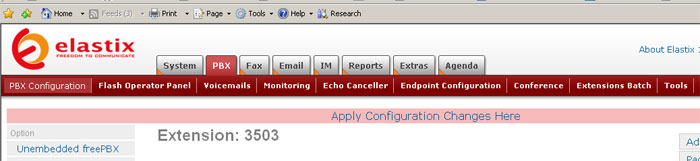
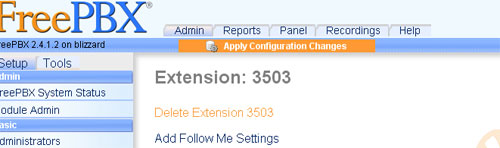
The web gui is not actually all that bad. I can honestly say they spent some time working on it, but there is one thing they did that drives me absolutely batty. What the hell is up with the red bar? You go in and edit an extension. At the bottom of the form is your standard issue submit button. You think you've made your change, you go and check and nope! It's still the same. You must have missed the red bar. Check out the image. As you can see, the red bar isn't all that red and looks very much like it is a part of the natural background. Up until you look closely and see the pale blue text that says "Apply Configuration" and proceed to facepalm. Unembedded FreePBX (The Elastix form is actually a front end for this) does this right. Notice the orange on blue. Completely contrasting and smacks you right upside the head and tells you that you need to do something. It's noticeable.
Another annoyance encountered dealt with the batch upload. Rather than manually setting up 40+ extensions, you can load a simple csv file and get all of them in at once. After loading (I did remember to click the red button), only some of my extensions worked properly. Oddly enough, only the ones manually entered. I checked to make sure the settings were exactly the same and on a whim, I decided to just hit submit and reload the config. Of course previously unworking extension started to work. I then proceeded to manually reload all the extensions to get the working. I am certain I could have done that from the command line, I just didn't know the way and with my luck I would have just killed something on accident (Yes I have that kind of luck. Ask me about my dead RAID unit sometime, and try not to laugh too hard at me).
With that out of the way, the next task was getting the operator panel online. One thing we noticed is that it could only display 39 extensions in its default configuration. So after a bit of googling, I come across instructions for altering the operator panel. And there is no gui for this. Off to the command line I go. One way a lot of users decide to show more buttons is to physically change how big they are. This option is a no-go for me. Firstly, getting them to look good is a pain in the ass from what I have read. Secondly, our receptionist is somewhere around 70 and her eyes aren't what they used to be (She is surprisingly good with working a computer, as far as receptionists go at any rate. She calls in a timely manner when there is a problem and is polite when something needs fixed.) So to change button positioning, there is a text file to edit: op_buttons.cfg and a perl script to edit: retrieve_op_conf_from_mysql.pl.
The buttons config defines the area that the buttons will take up in pixels on the screen. You can also change column headings, column colors and a few other options. The perl file is where you actually change where the buttons will be. Apparently you edit the perl file so it can generate a buttons config file (op_buttons_additional.cfg) and that file is included with the op_buttons.cfg to get the buttons and their placement. Any manual changes to op_buttons_additional.cfg get nuked whenever Asterisk restarts or the panel reloads. My first attempt at editing the two files was a complete disaster. I found out that it will not automatically extend its default four columns downward, but it will certainly add more to the right off the screen. So that was a dismal failure. I ended up removing the entry for queues (for call queues if you are running a call center) and extending my extensions there.
With that issue solved I moved on to the next one: I was not getting all of my parking lot extensions. For those who have not dealt with larger phone systems (namely me before this job) a parking lot is a set of extensions used for holding calls for other users. That way you can transfer the call there and someone can pick up anywhere in the shop instead of trying to get to their extension before the voicemail get it. Anyway, we have nine parking lots set up 51-59, and the operator panel was only displaying five of them. I double-checked my configuration and I had set up nine, so I delved into the mysterious perl file again and found this:
And that is pretty much where I stand now. I'll publish further update(s) and anecdotes from the whole process when the system actually comes online.
This was written back on the 18th and since then the system is now online. There will be more forthcoming in this series as soon as I get time to actually write it.
Elastix
The harder half of this endeavor has been the configuration of Elastix. I missed most of the operating system install, but I have been doing a lot of the work getting the extensions set up and configuring the operating panel. My boss got to set up the inbound and outbound routes and configure the trunk lines on the server. Being a Windows guy (and my DOS days being long behind me) I am not all that comfortable working straight from a command line anymore. Thus I attempted to use the web gui supplied with the software.
The web gui is not actually all that bad. I can honestly say they spent some time working on it, but there is one thing they did that drives me absolutely batty. What the hell is up with the red bar? You go in and edit an extension. At the bottom of the form is your standard issue submit button. You think you've made your change, you go and check and nope! It's still the same. You must have missed the red bar. Check out the image. As you can see, the red bar isn't all that red and looks very much like it is a part of the natural background. Up until you look closely and see the pale blue text that says "Apply Configuration" and proceed to facepalm. Unembedded FreePBX (The Elastix form is actually a front end for this) does this right. Notice the orange on blue. Completely contrasting and smacks you right upside the head and tells you that you need to do something. It's noticeable.
Another annoyance encountered dealt with the batch upload. Rather than manually setting up 40+ extensions, you can load a simple csv file and get all of them in at once. After loading (I did remember to click the red button), only some of my extensions worked properly. Oddly enough, only the ones manually entered. I checked to make sure the settings were exactly the same and on a whim, I decided to just hit submit and reload the config. Of course previously unworking extension started to work. I then proceeded to manually reload all the extensions to get the working. I am certain I could have done that from the command line, I just didn't know the way and with my luck I would have just killed something on accident (Yes I have that kind of luck. Ask me about my dead RAID unit sometime, and try not to laugh too hard at me).
With that out of the way, the next task was getting the operator panel online. One thing we noticed is that it could only display 39 extensions in its default configuration. So after a bit of googling, I come across instructions for altering the operator panel. And there is no gui for this. Off to the command line I go. One way a lot of users decide to show more buttons is to physically change how big they are. This option is a no-go for me. Firstly, getting them to look good is a pain in the ass from what I have read. Secondly, our receptionist is somewhere around 70 and her eyes aren't what they used to be (She is surprisingly good with working a computer, as far as receptionists go at any rate. She calls in a timely manner when there is a problem and is polite when something needs fixed.) So to change button positioning, there is a text file to edit: op_buttons.cfg and a perl script to edit: retrieve_op_conf_from_mysql.pl.
The buttons config defines the area that the buttons will take up in pixels on the screen. You can also change column headings, column colors and a few other options. The perl file is where you actually change where the buttons will be. Apparently you edit the perl file so it can generate a buttons config file (op_buttons_additional.cfg) and that file is included with the op_buttons.cfg to get the buttons and their placement. Any manual changes to op_buttons_additional.cfg get nuked whenever Asterisk restarts or the panel reloads. My first attempt at editing the two files was a complete disaster. I found out that it will not automatically extend its default four columns downward, but it will certainly add more to the right off the screen. So that was a dismal failure. I ended up removing the entry for queues (for call queues if you are running a call center) and extending my extensions there.
With that issue solved I moved on to the next one: I was not getting all of my parking lot extensions. For those who have not dealt with larger phone systems (namely me before this job) a parking lot is a set of extensions used for holding calls for other users. That way you can transfer the call there and someone can pick up anywhere in the shop instead of trying to get to their extension before the voicemail get it. Anyway, we have nine parking lots set up 51-59, and the operator panel was only displaying five of them. I double-checked my configuration and I had set up nine, so I delved into the mysterious perl file again and found this:
for (my $i = 1 ; $i <= $numberlots && $i <= 5 ; $i++ )Now I don't know perl, but I am pretty damn sure I can recognize a for loop when I see it. Two seconds and a reload later and I am in business with all the lots.
And that is pretty much where I stand now. I'll publish further update(s) and anecdotes from the whole process when the system actually comes online.
This was written back on the 18th and since then the system is now online. There will be more forthcoming in this series as soon as I get time to actually write it.
Subscribe to:
Posts (Atom)

 Posts
Posts